

Tips on usage
Match filtering
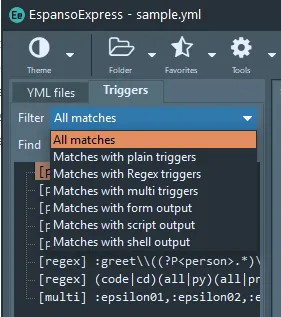
Section titled “Match filtering”The list of triggers in the current match can be filtered by match type:
Incremental find
Section titled “Incremental find”Incremental find (find as you type) can be performed in the list of triggers in the current match file.
Find in files
Section titled “Find in files”Use the find panel at the bottom left of the main window to search for text in triggers across all YML files in the active folder. Files containing the search term are listed. Clicking on a file will open it in the editor with the first match highlighted.
Sort matches
Section titled “Sort matches”The Sort menu enables sorting of matches within the current file. It includes a range of options for sorting.
Program settings
Section titled “Program settings”The dialog for program settings allow you to:
- Check for a program update
- Enable automatic update checks and set the frequency
- Specify settings for match files when converting from another text expander