

File handling
File format
Section titled “File format”EspansoEdit includes a filter so that only YML files are displayed in the file list. When the default folder is active the file list includes the match files from the $CONFIG/match folder. These files make up the base set of match files.
File tracking
Section titled “File tracking”EspansoExpress is intended for creation and edit of Espanso match files. Files that are created or modified in EpansoExpress are listed with a specific icon as show here for the files ee_test*.yml:
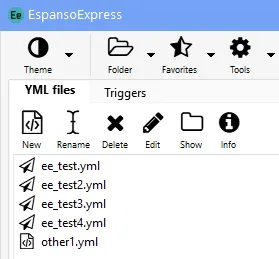
These files are tracked in each folder with a JSON file named ee_metadata.json.
Files from an external source
Section titled “Files from an external source”If you select a YML file that has not been created or modified in Espanso Express, a dialog will appear with the following options:
- Open the file with EspansoExpress
- Edit the file with EspansoEdit
- Go back and select another file
A YML file from an external source may cause parsing errors in EspansoExpress. If the file is modified in EspansoExpress, significant changes in formatting may occur when the file is saved.
The option to edit the YML file with EspansoEdit is useful for Espanso config files or in order to preserve existing formatting.
YML files created using the EspansoExpress convert function should open in EspansoExpress without any parsing errors.